Why Switcher Studio Is Perfect for Mobile Live Production in 2026
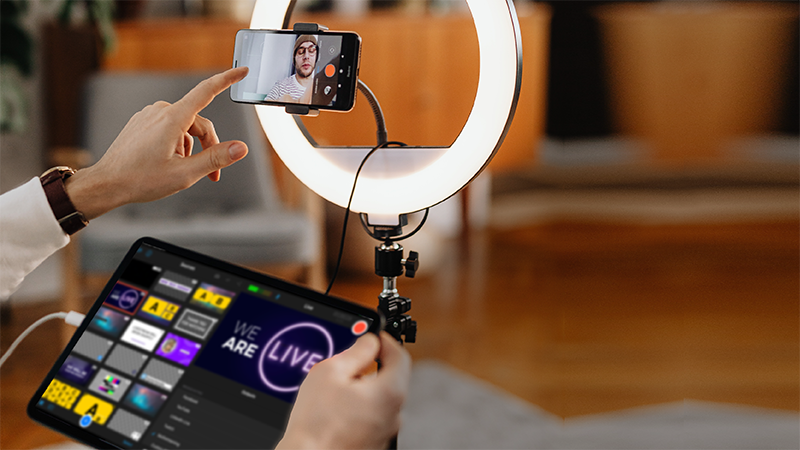
Switcher Studio allows creators, businesses, churches, sports teams, and live event producers to create professional multi-camera livestreams directly from iPhones and iPads.
What Makes Switcher Studio Different?
Unlike traditional broadcasting software that requires complex computers and capture cards, Switcher Studio focuses on mobile live production using iPhones and iPads.
This makes it one of the easiest ways to produce professional-looking livestreams without carrying heavy production equipment.
Who Is Switcher Studio Best For?
Church Livestreams
Many churches use Switcher Studio to run simple multi-camera broadcasts with minimal equipment.
Sports Streaming
Local sports teams and schools use it for basketball, football, volleyball, and live event coverage.
Businesses & Events
Great for webinars, conferences, product launches, and mobile event streaming.
Content Creators
Creators can produce professional live content without expensive studio hardware.
Main Features
- Multi-camera live switching
- Wireless iPhone camera support
- Mobile livestream production
- Graphics and overlays
- Scoreboards and lower thirds
- Screen sharing
- Guest interviews
- Streaming to multiple platforms
Why Mobile Production Is Growing
Mobile live production is becoming more popular because creators want smaller, faster, and more portable setups.
Switcher Studio helps remove the complexity of traditional live broadcasting while still offering professional production tools.
Pros and Cons
Pros
- Easy mobile setup
- Professional multi-camera workflows
- No powerful PC required
- Portable production solution
- Great for live events
Cons
- Mainly focused on Apple devices
- Advanced productions may still prefer desktop software
- Requires stable internet for best results
Is Switcher Studio Worth It?
If your goal is portable multi-camera live production using mobile devices, Switcher Studio is one of the best tools available in 2026.
It is especially useful for creators and organizations that want professional live broadcasts without complicated production systems.
Final Thoughts
Switcher Studio offers a modern and flexible approach to live production by turning iPhones and iPads into a complete mobile streaming studio.
For churches, sports streaming, events, and mobile creators, it can be an excellent solution for producing high-quality live broadcasts.
Visit Switcher Studio